Thursday, July 2, 2015

The canvas Tag

*** screen is used by javascript, use the var name vp instead ***

Finally the canvas, very powerful HTML5 tag.

It draws the mandelbrot set.
On FireFox.
On Google Chrome.
On Internet Explorer 11.

Next I will draw the mandelbrot set using 32-bit typed arrays.

Here is a zoom in on one of the pixels in the above set.

Typed Arrays

Before I talk about the canvas an understanding of typed arrays is needed. This is from the Mozilla Developer Network. These arrays will help us write to the canvas in a simpler way.

new TypedArray(length);
new TypedArray(typedArray);
new TypedArray(object);
new TypedArray(buffer [, byteOffset [, length]]);

where TypedArray is one of:

Int8Array();
Uint8Array();
Uint8ClampedArray();
Int16Array();
Uint16Array();
Int32Array();
Uint32Array();
Float32Array();
Float64Array();


Image Without The img Tag

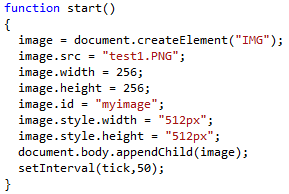
I had code that dynamically created an img. The code wouldn't work so I visited W3SCHOOLS and found that 'img' didn't work but "IMG" does.

Notice there is no img Tag.
There is a slight difference. The button is created first so it is displayed first but output is similar.
The file works the same.
This also works.

The img Tag

This is my latest test in recycling data.
Firstly notice the style declaration in the tag. This enlarges the image from 256 x 256 to 512 x 512.
Because the timer is continually running you have to get notified when the src is changed. In a real world application the images onload event will replace the button and onclick event.
The timer is simple to implement and the 50 stands for 50 milliseconds. 1000 / 50 = 20 ticks per second.
 Running the file on firefox gives us this output. On chrome it won't work, the image must be in a domain. Pressing the button at anytime produces this output.

On the server-side all the images are PNG files and compressed. On the client-side the RAM usage remains the same. Recycling the same memory and not creating more memory and overheads.

Wednesday, July 1, 2015

Javascript Arrays

One more post on covering the basics before we get to the canvas.

Arrays in Javascript are similar to other programming language arrays.

This is a dynamic array. Can be created and filled at anytime. Here is the output.

This is a static array, it is created as the HTML5 page is created. Has the same output.
Arrays can be altered after they have been created, all arrays are essentially dynamic. 
***To be safe make sure you never try to access an array beyond it's bounds. I use index%arraylength***


Tuesday, June 30, 2015

Number Inputs

An easy way to input numbers into an HTML document is with the input tag.
Here it is on chrome
Here it is on firefox
Here it is on internet explorer. Not a fan of IE11 but it's the only one that shows the slider value.

I could choose 20 and 80 exactly!

Monday, June 29, 2015

Number Systems

*** VAR is being phased out use LET instead ***

The VAR is the most important building block in javascripts arsenal. Unlike C, C++, C#, all data types are declared with VAR. Javascript figures out how you want to use it.

var str = "hello there";

Will create a string.

var num = 128;

Will create a number equal to 128 in decimal.

var snum = str + num;

Will create the string "hello there128"

Take the basic HTML5 template and add the extra following code.

You can format numbers into different number systems and display them as strings.
The output of this HTML5 file is:
The first is 128 in binary, Second is 128 in octal, finally 128 in hexadecimal. This comes in very handy as you will soon see.